Background
Interactions and visualizations have been useful for explaining concepts, although they are known to potentially mislead or confuse as often as they have been thought of as tools that help clarify concepts. VisuAlgo is a very successful1 example of interactive learning in CS education at an undergraduate level, which brings the algorithms that one would typically encounter in an introductory algorithms course to life: users can often provide their own input, and the interface does the rest. On the bottom-right corner one can typically see an implementation of the algorithm in code, which is “run through” as elements get manipulated on a “main stage”.
Other examples of deeply interactive experiences include:
- Brilliant
- Mathigon
- Seeing Theory
- The Wisdom and/or Madness of the Crowds
- The Evolution of Trust
- Parable of the Polygons
- To Build a Better Ballot
- Visualizing Quaternions
- Mechanical Watch
…to name a few. These combine interactive workouts interleaved with text, and usually encourage active participation from the reader. However, while such tools can be invaluable, they are often tedious and time-consuming to build, not to mention that they require fairly specialized expertise. For instance, Ben Eater, the creator of the quaternions visualization, says about the process of builiding the visualization2:
Since there wasn’t really anything like this yet, we built it all ourselves from a variety of existing web tools: WebGL (using threejs plus some custom shaders) for 3d stuff, raw canvas for the 2d stuff, howlerjs for handling the audio playback, and lots of React for the UI and to glue it all together. It’s very much a bespoke app. In the future, I hope we’ll build more of these and as we do so, the tech will evolve to something more easily generalized.
The availability of tools like chatGPT and its ilk, powered by large language models, have been the subject of much heated debate, especially in the context of their role in education. They have been viewed (e.g, by plagiairsm detectors, where challenges about false positives persist) as tools that can help students cheat, although there is also much work arguing for their use in helping students learn.
Here, I want to focus on something perhaps more mundane, but a theme that has been one of my favorite chatGPT use cases over the last few months: it’s utility in helping create materials that are too tedious to bring to life otherwise. It turns out that I often envision neat little interactive experiences when I am thinking about how to describe something: it could just be a thing that lets folks play with examples to build out some intuition or it could be something that helps bring out a specific element of an argument or an idea. However, the barrier of entry to creating those experiences myself is just a little out of reach, enough for me to not do it. But with the kind of help I have had from chatGPT, I feel invested enough to mess around.
For a lot of standard topics, there are plenty of visualizations and interactive experiences already available: so one might wonder if this is worth it. I do think that leveraging existing content that’s already been done well is important, but: (a) not everything is already done, and (b) experiences created from scratch allow for instructors to incorporate their own variations on the textbook premise, and would also offer the flexibility to be transformed into assessments — both of these goals are often hard to meet with off-the-shelf demonstrations.
Note: Although a lot of this discussion is about how instructors can leverage chatGPT as a tool to efficiently create visualizations and interactive experiences for their learners, none of the text in the blog itself is generated with AI 😀 To make this distinction clear, all text quoted verbatim from either books or chatGPT’s output will be placed in grey boxes. Prompts to chatGPT are not AI-generated either and are shown in boxes with a green background.
For Instructors
I’ll describe two examples of visualizations of textbook topics that may not be widely available otherwise. The entire chatlogs for the specific demonstrations can be found as PDFs at the following links:
(The May 12 release of chatGPT was in use.)
Exhibit A. The Subtraction Game
The subtraction game is the following.
The text goes on to encourage the reader to play the game to develop a feel for it, and uses the game as a running example to develop various concepts in combinatorial game theory, including strategies, positions, game trees, and so on.
The game of Subtraction can doubtless be played in a low-tech environment using a whiteboard, pen and paper, or an actual heap of tokens. However, an instructor may want to make an interactive version of the game available as a part of instructional material such as lecture notes. At this point, an instructor may look for an existing implementations, although in this particular example this may turn out to be a bit of a challenge: the internet is rife with so-called “subtraction” games, most of which have nothing to do with the game at hand. Besides, a custom implementation would provide a starting point for the development of related concepts, customized quizzes, and so on.
As discussed earlier, creating a playable version of Subtraction from scratch is arguably not a difficult exercise, but for most people it would be time-consuming to the point where the cost may outweigh the benefits. However, with a tool like chatGPT at hand, the process becomes substantially easier.
The output of chatGPT on this prompt, with some minor modifications in styling, leads to an interface that looks as shown below:
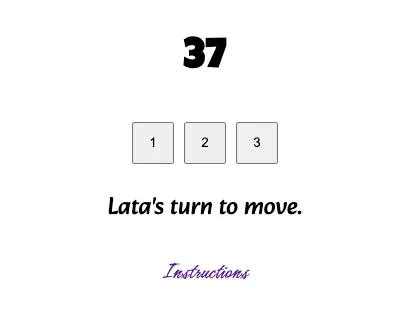
A natural extension to the game of subtraction is go beyond the numbers 1,2, and 3. One might then use a follow up prompt such as the one below.
In this process we realize that the players may run out of moves even before the number in question hits zero. An easy way to mitigate this is to ensure that one of the numbers is always one, while the others are randomly chosen. The output of chatGPT may have minor issues: for instance, the documentation in the instructions modal would possibly not adapted to the new set of numbers, the buttons may display the numbers in non-ascending order, and so on. All of these “quirks” are easily fixed with follow up prompts, and a working demonstration of the final implementation can be found here.
Exhibit B. Storing Files on Tape
The problem of optimally storing files on a tape is a classic example of an optimization problem that admits a greedy algorithm: the intuitive approach to the solution turns out to be the correct one.
We reproduce the problem statement as given in Algorithms by Jeff Erickson.
Now the key to appreciating the proof of the greedy algorithm here is to see that if we violate the “natural order” then we pay more in expected cost. While the calculation is straightforward, an instructor may find that it makes sense to motivate the main idea by allowing the learners to play around with some examples.
There are two approaches to visualizing this problem. In both cases, the stage consists of a tape represented as a long horizontal rectangle, and the files are represented as rectangles whose height matches the height of the tape, and whose lengths are proportional to their sizes. The expected cost of access of whatever is on the tape is displayed at all times, along with the optimal cost possible.
-
A predefined set of files are given and are initially placed outside the tape. The user can position them on the tape by, for example, dragging and dropping them on the tape, or double clicking them: in either case, the chosen file is appended to the end of the tape. We may allow the user to reorder the files on the tape by drag and drop actions or remove them off the tape entirely. The expected cost is dynamically calculated and displayed.
-
A set of files, say all equal in size, are already on the tape. The learner can then drag the boundaries to change the file lengths, and the change in costs update dynamically.
The First Approach
To create the first visualization, we started with the following prompt.
The first few outcomes on this and subsequent prompts had several issues:
-
the boxes were not stacked horizontally;
-
the drag and drop behaviors were unpredictable;
-
the pieces had spacing between them when pushed on the tape.
However, all of this was eventually fixed by describing the inaccuracies in natural language. We also added some functionality allowing the learner to see if their attempt was optimal:
Eventually, we obtain an interface that looks as shown in with some minor styling and updates in the desired widths.
Notice that one of the things that chatGPT had to do was randomly generate a set of pieces from a given set of widths that added up the exact width of the tape (as per our prompt). It did this using the following loop:
Evidently, if the sizes array does not have an appropriate set of sizes, this can loop forever. It turns out that chatGPT did not recognize this issue on its own, and it is typical of the sort of bug that the user would have to watch out for, either at the time of formulating specifications or while working through the output.
You can play around with the implementation that I finally ended up with here.
The Second Approach {#the-second-approach .unnumbered}
For the second approach, we start off with the following prompt.3
For visual clarity we also follow up with the following suggestion.
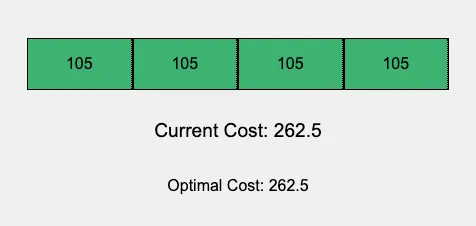
The initial configuration
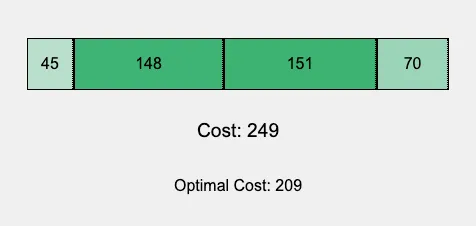
An example where the current cost is worse than the optimal cost.
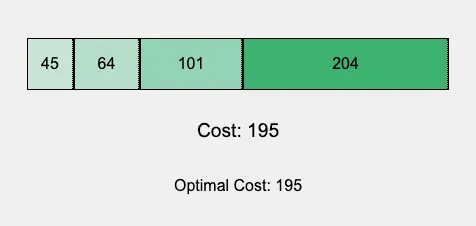
An example where the current and optimal costs are the same.
The current version of this implementation is here, and it’s still a little quirky in terms of the first couple of times you drag the slider, but stabilizes soon after. I hope to fix this… eventually :)
For Students
Sal Khan makes a compelling case for the use of AI to help with the learning process in a recent TED talk. In a computer programming exercise available on Khan Academy, a student needs to modify an existing snippet of code to “make two clouds drift apart”. The student attempts this by writing “leftX—”, but notices that this only affects the left cloud, and not the right one. The student then pulls up Khanmigo to inquire why the attempt did not work out, and Khanmigo recognized enough of the surrounding context to make a meaningful suggestion.
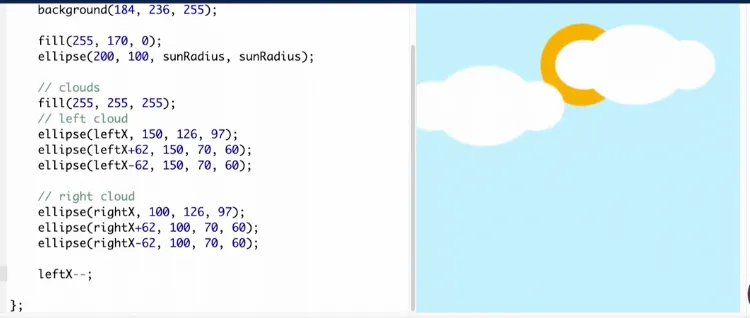
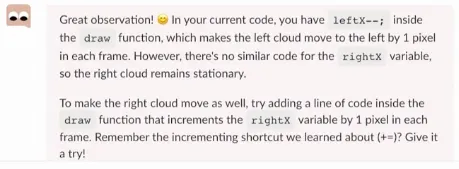
While Khanmigo is still under development a the time of this writing, this example already demonstrates the potential of a collaboration between a well-intentioned learner and a well-intentioned AI. Just as learning a language on a platform like Duolingo is an enhanced experience when we attempt talking with native speakers, so is programming language learning potentially enhanced by such transactions between the learner and someone who has the advantage of expertise.
As a sample counterpoint to this thread of thought, in a CACM blog, Bertrand Meyer argues that chatGPT may not, in fact, be helpful for (expert) programmers:
Here is my experience so far. As a programmer, I know where to go to solve a problem. But I am fallible; I would love to have an assistant who keeps me in check, alerting me to pitfalls and correcting me when I err. A effective pair-programmer. But that is not what I get. Instead, I have the equivalent of a cocky graduate student, smart and widely read, also polite and quick to apologize, but thoroughly, invariably, sloppy and unreliable. I have little use for such supposed help.
Check out the blog to see where this is coming from: you can eavesdrop on Meyer’s conversation with chatGPT and decide for yourself :)
What’s Next?
For the interactives discussed here, there are several ways of extending what has been cobbled together. For instance, for the visualization of Subtraction, a natural next step is to create an interactive process that allows the learner to visualize the game tree, at least for small versions of the game.
For the visualization of the problem of storing files on a tape, there are several possible enhancements:
(a) Show the cost breakdown more explicitly in terms of the formula, with a color coding that relates the numeric file sizes shown in the formula with the colors of the boxes on the tape.
(b) Add an option to generate the optimal ordering in the first approach.
(c) Gamify the problem where two users take turns to position files on the tape, and one wants to minimize the expected cost, while the other wants to maximize it: in particular, we establish a target cost, and the first player wins if the final cost is smaller than the target, the second player wins if the final cost is higher than the target, and the game is a draw otherwise.
(d) Generalize the visualization to the situation where we not only have files, but also associated frequencies of access.
These were just a couple of examples to suggest that creating fun and customized experiences for your classes may now just be a little easier than before, and hopefully this encourages more of us to experiment with the ideas we have.
On the theme of learners using chatGPT: there are several demonstrations that LLMs do well on the kind of programming tasks that show up in introductory coursework; for instance here is a preprint suggesting as much:
We […] evaluate the performance of Copilot on a publicly available dataset of 166 programming problems. We find that it successfully solves around half of these problems on its very first attempt, and that it solves 60% of the remaining problems using only natural language changes to the problem description. We argue that this type of prompt engineering, which we believe will become a standard interaction between human and Copilot when it initially fails, is a potentially useful learning activity that promotes computational thinking skills, and is likely to change the nature of code writing skill development.
Such illustrations simply reinforce my sense that class materials and exercises should be adapted so that LLMs can be leveraged by students to accelerate their learning processes, making the “cheat use case” implausible almost by defintion. I realize this is easier said than done, but it’s already interesting to see all the ideas that have come up to this effect.
Check out this very cool thread on Porpoise, a tool meant to help learners articulate specs for a given task: the first part of the exercise is reverse engineer what the task in question based on some sample I/O that is given, and the second part is to write it up so that chatGPT can produce code to match the sample I/O + some hidden tests that extrapolate on the samples.
Apart from writing code, chatGPT/Copilot/Ghostwriter can read code too, and often provide surprisingly relevant insights on why a piece of code does not work as expected. One context in which I would like to leverage this is to look at failed submissions on competitive coding platforms. Perhaps with some background from the editorials, chatGPT and its ilk can provide meaningful explanations of why something does not work, and if this turns out to be reliable, then it potentially removes some of the frustration from the learning process without short-circuiting it in bad ways.
I am aware that the release of chatGPT and friends has unleashed a flurry of work in the teaching/learning space, so do let me know in the comments if you have pointers to fun projects and ideas!
Footnotes
-
The success of Visualgo is witnessed by its wide usage and several anecdotal reports of positive feedback. ↩
-
At the time this writing, this comment is from five years ago, and to the best of our knowledge, not much has moved along on the state of the art in terms of tools for authors of interactive experiences. ↩
-
The conversation found in the supplementary material differs slightly from what is shown below; we have consolidated some of the prompts in the interest of brevity. ↩